Google Glass in the Academic Library: The Exploration of Google Glass in the Marydean Martin Library
Author, Ernesto Hernandez
Emerging Technologies Librarian
Nevada State College – Marydean Martin Library
email: ernesto.hernandez@nsc.edu
Developed by Google, Google Glass is a wearable computer with an optical head-mounted display (OHMD). This wearable computer frame with an OHMD comes with or without lenses and displays information in a prism projector located just above the right eye. Google Glass has the ability to take photos, record 720p HD video and allow the user to have access to the web, weather, Google Hangouts, email, news and integration of specific apps.[1] Users can also issue voice commands to initiate Google Glass by first saying “ok glass,” followed by the command. A touchpad is located on the side of Google Glass, allowing users to control the device by swiping through a timeline-like interface on the screen.
Although at the time of this writing Google Glass is not yet readily available to the public; I was lucky enough to be an invitee to test the Explorer Edition of Google Glass. As the Emerging Technologies Librarian at Nevada State College, I had a strong interest in becoming an early adopter of this new technology. The Google Glass Explorer program is available for consumers to test Google Glass, provide feedback, and gauge how people will want to use it.[2] One of my main initiatives at the Marydean Martin Library and the role as Emerging Technologies Librarian is to provide faculty and students with access to emerging and innovative technological resources that foster the opportunity to improve and enhance teaching and learning. With this opportunity to become a Google Glass Explorer, the staff at the Marydean Martin Library felt this purchase costing approximately $1500 was a smart investment considering our goal of providing innovative and new ways to teach and learn using technology.
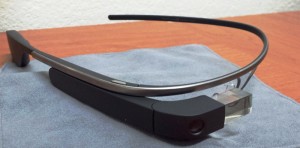
Why would an academic library be interested in Google Glass?
The ideas for Google Glass use seem to be limitless as evidenced by the official Google Glass social media sites provided to users for ideas, improvements and feedback.[3] [4] With Google Glass being in the forefront of technological ingenuity at the Marydean Martin Library, I have begun to open up dialogue with faculty on their teaching and research practices on how they would use Google Glass in the classroom. One idea that I am currently testing is how I could use Google Glass to supplement my one-shot information literacy sessions. Ideally I would record the info-lit session from my point of view thus giving viewers of the video a librarian’s point of view on how to find and access information from the library’s website and databases as well as basic step-by-step bibliographic instruction. Similarly, I could give a point of view video tour in real-time online for distance education students and anyone else interested in learning more about the library. These audiovisual recorded tours could also provide augmented reality overlays and imagery for highlighting certain areas of the library including special collections, artwork or events. Another potential use for librarians is 1-on-1 consultations through Google Hangouts. Of course, the other person will need to have a Google account and webcam for this type of consultation. The unique feature about using this piece of technology is that I can present, lecture, or advise without taking my attention away from my intended audience. Often times a lecturer or presenter stands behind a laptop or PC and might have to fumble through notes; with Google Glass your notes and slides would readily be available with a simple swipe or voice command making these instantly available through the prism projected screen. Essentially, this would allow me to connect more personally to my audience.
Although these pricey frames are not freely available for checkout to students, our library welcomes students to try them on and use them in the library. I have held a Google Glass day in the library in which I did a live demonstration of using Google Glass and then let attendees try them on and test them. 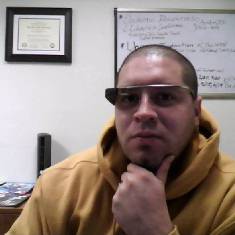 I have also encouraged staff and students to share their ideas and suggestions for use while wearing Google Glass in their studies and coursework. Faculty who would like to use them in their classroom are asked to submit a request to reserve a date and time and are encouraged to share the results of their Google Glass use with others. Although many faculty have shown interest in using Google Glass in the classroom, many are not quite sure how to incorporate it into their instruction.
Above: Photo of Ernesto Hernandez wearing Google Glass.
Ideas for Google Glass use on campus
Aside from use in the library and by librarians, here are some ideas and suggestions for use in the classroom:
Flip the classroom using Google Glass. Record lectures, tutorials or lessons using Google Glass
Take virtual field-trips similar to the one from Andrew Vanden Heuvel from CERN’s Large Hadron Collider [5]
Real-time reference checking; while wearing Google Glass a user can search online to see if information or sources/citations are correct (e.g. fact checking a research paper or poster session at the point of need)
Provide real-time language translation of foreign texts. Google Glass has the ability to provide translation of text visually and through audio. This also works great for speaking to others in their native language with the capability of voice translations
Visual media courses could use Glass for a capture tool or short video/stop-motion animation
Access to visual diagrams and tutorials for health sciences, engineering, physics, etc. for hands on work
The ability to send messages/email at the point of need (including real-time photos/videos and notes)
One of my favorite features of using Google Glass in higher education is how this tool does not come between me and the experience; the experience being teaching and learning. Using Google Glass should be an experience that often supplements my primary goal without much complication. I am able to enhance and augment my teaching without Google Glass being overly complicated. Through continued use, ideas, suggestions and improvements, I see many opportunities for Google Glass to be a success at Nevada State College.
Implications for using Google Glass on campus
With any new technology, specifically one with the ability to take photos and videos, we cannot overlook the privacy concerns many people have. Concerns have been raised by many regarding the intrusion of privacy, etiquette and ethics of using the device in public. For the brief period of time we’ve been using our explorer edition of Google Glass, the most disconcerting thing about the frames is that you can be recording video at any time or snap a picture without anyone really knowing. The privacy and safety concerns are numerous but similar to the way many reacted when smartphones allowed users to take pictures and video and use the internet on a mobile device. Although Google has vaguely addressed privacy issues, Congress has recently asked Google for comment and is looking at future implications should Google Glass become available to the public.[6] The Electronic Privacy Information Center currently has a document specifically addressing many of these same privacy and surveillance issues.[7]
Currently, the Marydean Martin Library only has a single frame to be shared among faculty and staff. The privacy concern has been discussed but it does not seem to be an issue as we are sure to follow Nevada State College’s guidelines regarding video, photo and use of mobile devices on campus. Those who would like to use Google Glass in the classroom would need to understand the etiquette and ethics of using this device. This would fall in line similarly to how we record live classroom lectures using lecture capture software and cameras; faculty and students would be informed ahead of time and agree to have a recorded lecture with the possibility of them in the recording.
Future of Google Glass
Inside higher educational institutions, there are many ways Google Glass can supplement everyday activities. Given the increasing emphasis on efficiency and accountability in higher education, librarians and instructional technology staff must be able to demonstrate the ways that Google Glass can augment and enhance the student learning experience. At Nevada State College I hope my approach is seen as a way to foster creativity and engage Google Glass users to explore their interests in new and exciting ways. With as fast as technology advances and the wave of new wearable smart technology begins to arrive, I am excited to be able explore the capabilities of using Google Glass on our campus. Google Glass is an early product that is still in beta; it is also an experiment as well as a social-interaction project, and I hope that through my experimentation and exploration I can demonstrate the numerous possibilities of using this type of technology in higher education. As an early adopter and Google Glass Explorer, I am excited to create an environment in which these tools lead to transformative learning experiences.
The following is an interactive image of Google Glass I created through the website thinglink. Hover over the image to view target touch-points with information about Google Glass. I’ve also created a sample point-of-view video tour split among 11, 10 second clips of the Marydean Martin Library: http://goo.gl/uJbGdZ
Notes
Source: creativelibrarypractice.org


 Αναρτήσεις